Memlow delivers private, offline-first notes, diaries, and task management
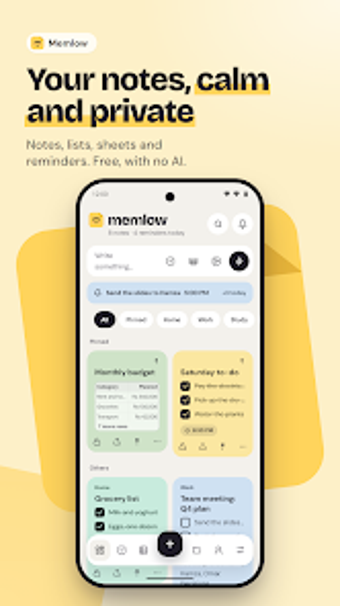
Memlow: Notes Notepad Diary captures rich notes, checklists, and media while enforcing a 'No AI' content policy and offline-first access. The app, from Entherion, combines a rich text editor with folders, tags, and reminders, plus PIN and fingerprint locks for sensitive entries. Its customization options and encrypted Google Drive backups target privacy-conscious professionals, students, and solo contributors who need a local, searchable notebook that works without a constant connection.
What type of work does Memlow support?
Memlow functions as a hybrid notebook, private diary, and task manager, letting users record meeting memos, study notes, or daily journal entries. The editor accepts headings, tables, code blocks, and Markdown, while integrated checklists and reminders cover basic task workflows. Those using it for meeting summaries or study logs can store text, photos, and audio inside the same note, keeping content organized alongside to-do items.
How does Memlow structure professional workflows and output?
Organization relies on folders, tags, pins, and an archive system so projects and subject areas stay separated. The task system adds reminders with snooze, and notes can include speech-to-text entries for rapid capture. Encrypted backups to a user-controlled Google Drive let teams or individuals migrate data between devices without the developer's servers holding plaintext content, which preserves an offline, device-first workflow while allowing portable archives.
Is Memlow easy to adopt and secure for business use?
The app runs on Android and in web browsers, so standard desktop or mobile setups access the same content. Onboarding is reduced by built-in themes and over 30 fonts, including handwriting styles for aesthetic notes. Security offers PIN and fingerprint locks that apply to the whole app, specific folders, or individual notes. The 'No AI' policy and local-first design mean data stays on-device unless the user opts into encrypted Drive backups.
Who should pick Memlow and where it may not fit
Memlow is a privacy-focused option for professionals and students who want offline access and local control of notes, journals, and simple task lists. It suits users who value encrypted backups to their own Google Drive and strict non-AI handling of content. Those who need real-time multiuser collaboration or native iOS apps will find it less appropriate because those capabilities are not part of the described feature set.